
VoiceSterize
Fully Automate Noise Reduction and Voice Polishing.

Download Price: ¥1,500
- Want crystal-clear audio for YouTube and Podcasts?
- Need to balance volume levels across multiple tracks?
- Want to transcribe your recorded audio automatically?
- We have the simple solution to all your needs.
Product Overview
Polish Your Voice. Professional Quality Noise Reduction & Mastering Tool.
Optimizes recorded speech into clear, broadcast-ready audio.
Noise removal, loudness normalization, True Peak control, and transcription—all in a single click.
Feature Highlights:
1. High-Precision Noise Removal with SpectralNoiseGate
Unlike standard noise gates that judge solely by volume, our Spectral Gate analyzes sound by frequency components, identifying noise precisely within each band. It simultaneously handles high-frequency hiss and low-frequency rumble without damaging the essential voice signal—that is the power of spectral processing. It leaves only the voice, correcting it to a natural, intelligible, and clean sound quality.
2. Broadcast-Standard Volume with LUFS Normalization
Automatically optimizes audio to meet Podcast delivery standards (-16 to -14 LUFS). It eliminates volume disparities between videos or multiple audio sources, improving the listening experience for your audience.
3. Proprietary Limiter with True Peak Support
Equipped with a custom limiter to prevent clipping and distortion. It maintains a clear sound image while maximizing sound pressure—perfect for achieving both impact and clarity in YouTube videos and game voice-overs.
4. High-Accuracy Transcription Powered by Whisper
Automatically converts recorded audio into text, speeding up subtitle creation and script organization. Ideal for interviews, video narration, and meeting logs.
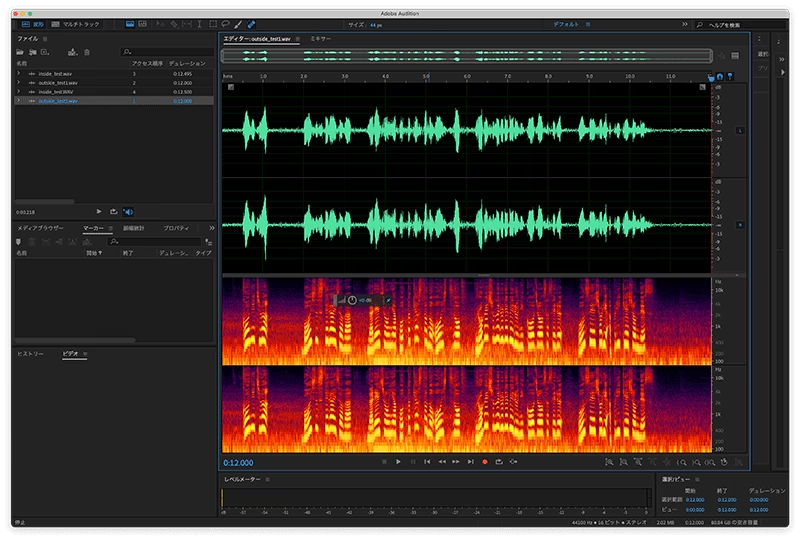

Professional Audio Quality for Podcasts & YouTube with Just One Click.
Releasing “VoiceSterize” – The Noise Reduction & Polishing App.
Hello, I am Nakamura from Brainstorm Co., Ltd. I work professionally in game sound design and radio program production. In my line of work, I sometimes process over 2,000 voice files a month. To streamline this, we at Brainstorm developed a new Mac application: VoiceSterize.
Takayuki Nakamura
Brainstorm Co., Ltd. December 10, 2025
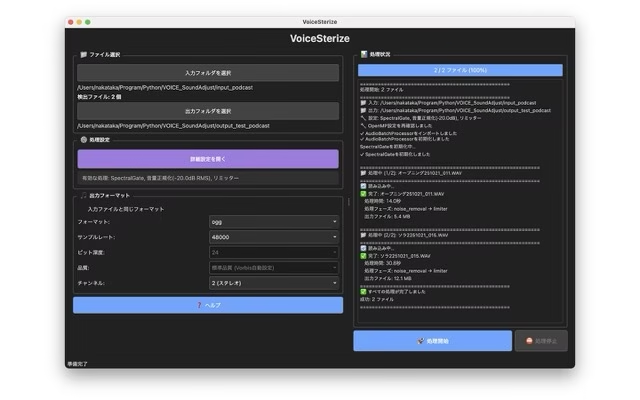
Automate the Tedious Post-Recording Process.
1. Batch Process with Pro-Grade Workflows
Save presets tailored to your needs—Podcasts, Radio, YouTube, or Game Voices. Even if your recording location or editing environment changes, you can finish your audio to the same consistent quality standard every time.
2. Simultaneous Text & Audio Output for Better Data Management
Text transcribed by Whisper is saved in a structure that is easy to organize per project. This smooths out post-production tasks like managing game dialogue lines, creating video subtitles, or correcting scripts.

Technical Deep Dive: SpectralNoiseGate
SpectralNoiseGate: Intelligent Noise Removal that “Sees” Frequencies.
Introduction:
While general noise gates judge based on volume alone, SpectralNoiseGate decomposes sound into frequency components to identify noise precisely in each band. It processes high-end hiss and low-end rumble simultaneously without compromising the vital voice signal. Achieve professional clarity for podcasts, narration, and music production. Get studio-quality audio processing with simple operation.
The Fundamental Difference from Traditional Gates:
Standard noise gates monitor the amplitude (volume) of the entire signal and mute it when it falls below a threshold. This has a fatal flaw: quiet speech and loud noise are treated as the same “volume.”
SpectralNoiseGate takes a completely different approach. It converts audio into the time-frequency domain and makes noise judgments independently for each frequency band. This allows for advanced processing, such as removing hiss in the high frequencies while preserving voice signals in the low frequencies.
Processing Flow: 4 Steps
- Step 1: Short-Time Fourier Transform (STFT) – Splits the signal into small time windows and analyzes frequency presence.
- Step 2: Noise Profile Estimation – Learns noise characteristics from silent sections to establish a baseline.
- Step 3: Adaptive Mask Generation – Compares signal vs. noise levels at each frequency point to create a precise gate mask.
- Step 4: Inversion and Reconstruction – Reconstructs the audio signal smoothly, maintaining natural sound quality.
Overwhelming Advantage in Voice Processing:
The true value of SpectralNoiseGate lies in its ability to remove noise precisely while keeping the voice natural. It eliminates “gate chattering” (unnatural cutoffs) common in traditional gates and can handle multiple types of noise (air conditioner hum, mic hiss, etc.) simultaneously. It even works effectively on narration with background music.
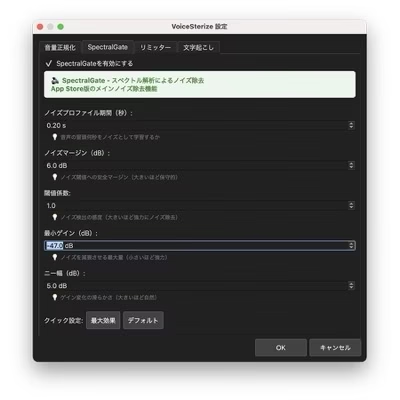
(Technical Parameters)
- Noise Profile Time (sec): Length of floor noise used for profiling.
- Noise Margin (dB): Safety margin for the noise threshold.
- Threshold Factor: Sensitivity of noise detection.
- Min Gain (dB): Maximum amount of noise attenuation.
- Knee Width (dB): Smoothness of gain changes.
Frequently asked questions
A1: It is an audio polishing tool that cleans up recorded voice to professional quality. It performs noise removal, volume optimization, and transcription in one click, delivering broadcast-ready audio.
A2: It features four main functions: ① High-precision noise removal via SpectralNoiseGate, ② Volume unification via LUFS Normalization (-16 to -14 LUFS), ③ True Peak Limiter, and ④ Automatic transcription using Whisper.
A3: Unlike standard noise gates that judge by volume only, VoiceSterize decomposes sound into frequency components to identify noise per band. It removes multiple types of noise simultaneously while preserving the naturalness of the voice.
A4: It is suitable for improving the quality of all voice content, including Podcasts, YouTube videos, game voice recordings, radio production, interviews, meeting logs, and narration.
A5: No, all processing is completed with a single click. You can save presets for different uses, ensuring consistent quality even if recording environments change.
A6: All processing is done locally on your device. Audio data is never sent to external servers. We do not collect personal information, so you can use it safely even with confidential audio.
A7: We use state-of-the-art Whisper technology to achieve high-precision automatic transcription. It significantly streamlines post-processes like subtitle creation and script organization.
A8: It supports common audio formats (WAVE, AIFF). Processed data is output as both text and audio simultaneously, saved in a structure easy to organize per project.
A9: You can download it from the Mac App Store. It is a macOS application available for immediate use after purchase.